Test your website as an iPhone from Claude Code
I build Dejo, so weigh my view with that in mind. Everything below comes from runs I did on 4 November 2026 with Dejo 0.4.0, on public pages, plus one re-run on 10 November.
Short answer: yes, Claude Code can check your site as an iPhone. Give it a browser tool that can emulate a device, ask it to open the page "as an iPhone 13", and it will take a full-page screenshot and read the layout. If you want a quick look once, Playwright MCP with --device "iPhone 15" is fine. If you want the same phone check after every deploy, Dejo saves it the first time and repeats it later in one call, or from cron with no model at all.
| if you want to… | use |
|---|---|
| look at one page as a phone, once | Playwright MCP or Playwright CLI with --device |
| switch the full device (user agent, touch) on and off in one session | Dejo (emulate device ... is a step, and emulate device off undoes it); Playwright MCP can only resize the window without a restart |
| repeat the same phone check after every deploy | Dejo, then dejo run --json from CI or cron |
| test Safari's own rendering | Playwright with WebKit, or a real device; emulation in Chrome can't do this |
| check the Chrome you're already signed in to | Claude in Chrome (its docs don't mention device emulation) |
What "as an iPhone" means here
Device emulation tells the browser to act like the phone: a 390 by 844 screen for an iPhone 13, a pixel ratio of 3, touch events and the iPhone's user agent string. Your responsive CSS, your matchMedia checks and any mobile-only code all run as they would on a phone.
It is still Chrome's engine. Dejo drives Chrome or Chromium only. So a bug that only Safari has (a position: sticky quirk, a date input that looks different) won't show up. I'd use emulation to catch layout problems early and still open the real phone before a big launch.
You can see the user agent working on Wikipedia. Opened "as an iPhone 13", it sent the mobile site, the one with the hamburger menu, without being asked.
The steps Claude sends
I didn't use a Claude session for this part. I sent the calls Claude would send, from a small script, to Dejo's MCP server (the one you add with claude mcp add --scope user dejo -- dejo-mcp). The task was "check the page as an iPhone 13" on five public pages. These are the steps, one per line, as Dejo received them for pypi.org:
emulate device "iPhone 13"
go https://pypi.org/project/dejo-mcp/
read box css "main" as main_box
screenshot full as pypi_iphone
read metrics as speed
read box gives the element's place and size in CSS pixels (x, y, width, height). If the main column is wider than 390, something sticks out sideways. screenshot full saves the whole page as a PNG under ~/.dejo/captures, and read metrics gives the browser's own load numbers.
Here is what came back on the first run, on each page:
| page | main element (x y width height) | wider than the screen? | largest contentful paint |
|---|---|---|---|
| dejo.run | 0 68 390 369 | no | 280 ms |
| news.ycombinator.com | 0 0 390 1737 | no | 188 ms |
| en.wikipedia.org (Playwright article) | 0 371 390 1862 | no | 380 ms |
| pypi.org/project/dejo-mcp | 0 135 390 1329 | no | 256 ms |
| docs.python.org (json module) | 16 129 358 18495 | no | 1,260 ms |
None of the five pages spill past the screen. The Python docs page is 18,495 pixels tall on a phone, which is long, but it fits. All of these numbers are one run each from a cloud machine, so treat the timings as rough.
One thing I didn't expect: Dejo refused my first try, read box css "body". I didn't save that reply, so on 10 November I sent the same steps again on dejo.run. The reply was "that read is the whole page (13 characters), and every replay would hand all of it back". It won't save a read that would return everything, so I pointed it at the main column instead.
What the first visit hides
The first run on Wikipedia had a yellow "Wikipedia has an app!" banner on top. The later runs didn't. I think the reason is that Dejo keeps its own browser profile, so the banner, once shown, stayed away for that profile. I didn't check this further.
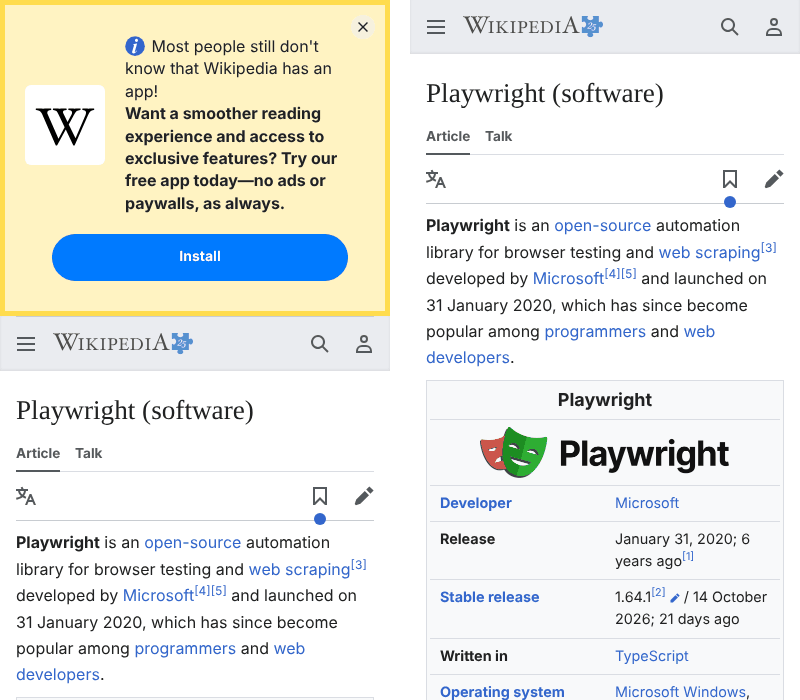
This matters for your own site. A new visitor on a phone sees your cookie banner, your newsletter pop-up and your app prompt all at once, and that's the screen where layout bugs hide. A Dejo replay looks like a returning visitor, because the profile keeps its cookies. If your check must look like a first visit every time, Playwright MCP with --isolated starts from an empty profile on every session, and it is the better fit for that one job.
Doing it again costs one call
The reason I'd use Dejo for this is the second run. When a step reads an answer, Dejo saves every step with a check. The next time, in a fresh server process, the same request is one dejo_run call:
done: "check the page as an iPhone 13" on news.ycombinator.com (profile default), 6 steps replayed in 882 ms, no page reading.
main_box = 0 0 390 1737
news_iphone = ~/.dejo/captures/news.ycombinator.com-20261104-192734-659402.png
speed = first byte 116 ms, first paint 184 ms, ...
(I shortened the screenshot path; the reply has the full one.)
Across the five pages, learning took two calls: one where Dejo shows the page (4.9 to 7.6 KB of text back to the model) and one with the steps (1.1 to 1.3 KB). Each replay was one call with about 750 to 780 bytes back, and Dejo replayed the six steps in 0.9 to 2.2 seconds.
You don't even need Claude for the repeat. From a terminal, a cron job or a CI step:
dejo run "check the page as an iPhone 13" --site dejo.run --json
{"outcome": "done", "ok": true, "site": "dejo.run", "task": "check the page as an iPhone 13", "answers": {"main_box": "0 68 390 369", "dejo_iphone": "~/.dejo/captures/dejo.run-20261104-193305-550490.png", "speed": "first byte 63 ms, first paint 208 ms, first contentful paint 208 ms, largest contentful paint 208 ms, dom ready 150 ms, load 250 ms, layout shift 0.000, 58 requests, 33 KB"}, "saved_files": [], "duration_ms": 1531, "model_calls": 0, "reason": "", "repair": null}
(Only the screenshot path is shortened; the rest is the output as printed. The command exited with 0.)
model_calls: 0 is the point. The check runs after every deploy and costs nothing in tokens. If the main column ever reads wider than 390, your script can fail the build. I wrote more about running a saved task on a schedule in run a website task every day with zero AI cost.
The same check with Playwright MCP
Playwright MCP (I used 0.0.84) emulates a device with a start-up flag: --device "iPhone 15", or --mobile for a generic phone. Its --help text for --mobile adds "Mobile pages are usually lighter, which saves tokens", which is a fair point. The device flag is for the whole server. Inside a session the browser_resize tool changes the window size, so a narrow-screen check doesn't need a restart. Changing the full device (the iPhone user agent, touch) does: you restart the server with other flags.
I ran it once on the same pypi.org page with --device "iPhone 13". The full-page screenshot came back as an image in the reply (15,152 base64 characters), so the model sees it. It showed PyPI's "Client Challenge" page. The page title was "Client Challenge" when the page opened and "Loading https://pypi.org/project/dejo-mcp/" when the screenshot was taken, so I think PyPI's browser check was still running. Dejo's run of the same page a few minutes earlier got the real page. That's one run each, and I don't know if it happens every time. It is a reminder to wait for something real on the page before you screenshot it.
Playwright can also drive WebKit, Safari's engine, which Dejo can't. If Safari is what worries you, that's the better tool.
Where Dejo is the wrong pick
- One look at one page: Dejo's first run takes two calls and sends the page outline to the model, about the same as any other tool. Saving it only pays when you check again.
- Safari bugs: Dejo emulates the iPhone in Chromium. Use WebKit or a real phone.
- A first-visit check every time: Dejo's profile remembers cookies, so banners you saw once may not come back.
- Pages behind your own sign-in: Dejo has its own browser, so you sign in once in its window (
dejo login), or you connect it to your running Chrome withDEJO_CDP_URL. Claude in Chrome already has your sessions, but its docs don't mention phone emulation.
How I tested
Dejo 0.4.0 installed from PyPI (pip install dejo-mcp) on a Linux cloud machine with Chromium, on 4 November 2026. I drove the MCP server by hand with a small Python client (no model), sending the same two calls Claude would send, then started two fresh server processes per page for the replays. Five public pages, read only: nothing was signed in to, typed into or submitted. Playwright MCP 0.0.84 ran once on one page with --device "iPhone 13" --isolated --headless.
What I did not test: real iPhones, Safari or WebKit, pages behind a sign-in, and how many tokens a full Claude Code session would use (I measured bytes returned by each call, which the model reads, but not the model's own tokens). I saved the client script, the replies behind every number in this post and the screenshots shown here. The body refusal reply is from a re-run on 10 November, because I didn't save the first one. For token numbers from real Claude sessions, see the benchmark.
Related reading: running a website task every day with zero AI cost, an AI agent with multiple signed-in user roles and why browser agents fail on real websites.
FAQ
Can Claude Code test my website on an iPhone?
It can test it as an iPhone-sized browser. With a browser MCP that can emulate a device (Dejo, Playwright MCP, Playwright CLI), Claude opens your site with an iPhone's screen size, touch and user agent, takes a screenshot and reads the layout. It is still Chrome's engine, not Safari, so it won't catch Safari-only bugs.
How do I make Playwright MCP emulate an iPhone?
Start the server with a device flag, for example `npx @playwright/mcp@latest --device "iPhone 15"`, or `--mobile` for a generic phone. The device setting applies to the whole server. Inside a session you can change the window size with its `browser_resize` tool, but to change the full device (user agent, touch) you restart the server with other flags.
Is device emulation the same as a real iPhone?
No. Emulation gives the page an iPhone's viewport, pixel ratio, touch events and user agent, so responsive CSS and mobile-only code run. The rendering engine is the one the tool drives. For Safari's own engine, use WebKit (Playwright supports it) or a real device service.
Can I run the iPhone check every day without paying for the model?
Yes, with a tool that saves the task. Dejo stores the steps the first time; after that `dejo run "check the page as an iPhone 13" --site yoursite.com --json` repeats them from cron or a CI job with zero model calls and exits 0 when every step passed.